When I work on support operations, I often see routing problems start long before a ticket reaches an agent. The issue is usually not volume alone. It is structure. If every incoming request lands in a broad, vague bucket, then billing problems get mixed with password resets, technical incidents get mixed with plan changes, and account access questions get lost in a sea of “other.” That kind of setup slows response times, creates avoidable transfers, and makes reporting almost useless.
A support taxonomy is one of the most practical things I can build for a service team, and one of the most underestimated. It is not just a list of categories. It is a decision system that shapes how tickets are classified, routed, measured, and reviewed. When I design one, I try to make it simple enough for agents to use quickly, but detailed enough to support accurate routing and meaningful analysis. That balance matters, because a taxonomy that is too shallow hides patterns, while one that is too complex frustrates everyone who has to use it.
Why I separate billing, technical, and account issues first
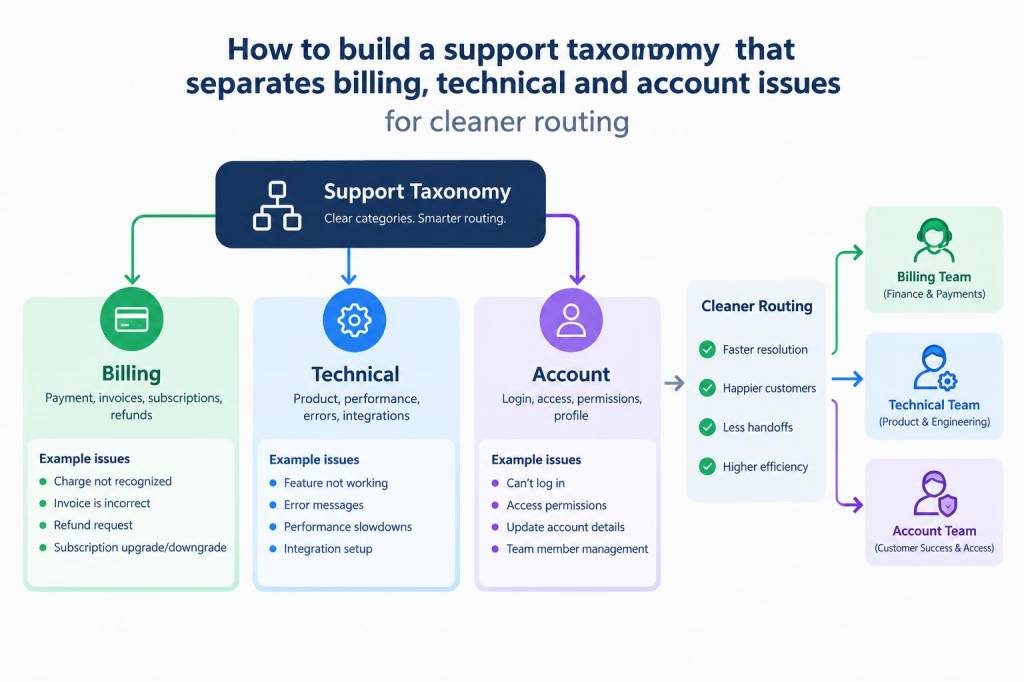
I start with these three groups because they reflect very different customer intents and usually require different people, skills, and workflows. Billing issues often involve payments, invoices, refunds, failed charges, tax questions, or subscription adjustments. Technical issues usually relate to bugs, product behavior, integrations, error messages, performance, or setup problems. Account issues are about identity, access, permissions, profile changes, ownership transfers, or security verification.
These categories may sound obvious, but they solve three real problems at once. First, they reduce misrouting. Second, they help me define clear ownership. Third, they make reporting more useful because each group tends to have a different root cause and a different operational fix. A spike in billing tickets may point to a pricing change or payment gateway issue. A spike in technical tickets may signal a release defect. A spike in account tickets may reveal friction in onboarding or access management.
In other words, I am not organizing tickets just for neatness. I am creating a structure that helps me answer questions faster: What is happening? Who should handle it? What should we improve?
What I include in a practical taxonomy
When I build a taxonomy, I try to make it layered. A good structure usually has a primary category, a secondary reason, and sometimes a product or channel tag. That gives me enough detail for routing and reporting without forcing agents to scroll through endless menus.
A simple version might look like this:
- Primary category: Billing, Technical, Account
- Secondary reason: Refund request, invoice error, login failure, API error, password reset, permission change
- Product area: Subscription, dashboard, mobile app, integration, payment system
- Urgency marker: Standard, time-sensitive, critical
- Customer segment: Individual, team, enterprise, partner
I do not recommend adding every possible subreason on day one. I prefer to begin with the reasons that appear most often and have the biggest operational impact. Once the taxonomy is in use, I review ticket data and refine it based on actual patterns rather than assumptions.
How I design labels so agents use them consistently
Consistency is where many taxonomies fail. If one agent labels a ticket as “payment failed,” another uses “billing problem,” and a third chooses “charge issue,” then reporting becomes fragmented. I avoid that by making labels specific, mutually exclusive, and written in language that matches customer intent.
I also keep label names short and action-oriented. For example, I prefer “invoice request” over “customer needs invoice copy.” I prefer “login failure” over “can’t access account due to login issue.” The shorter version is easier to select, easier to train on, and easier to analyze.
Another rule I use is to define each label with examples and non-examples. That sounds basic, but it removes a lot of confusion. If I label “billing dispute” as a category, I explain that it includes incorrect charges and contested fees, but not failed payments caused by expired cards. That failed payment belongs elsewhere. This kind of boundary-setting is what keeps routing clean.
How I map issues to queues without creating overlap
Once the taxonomy exists, I map each category to a queue or team based on ownership. This is where clarity matters most. I do not want one queue to receive everything and sort it later. I want the system to direct tickets to the right place as early as possible.
Here is a structure I often use:
| Issue family | Common examples | Primary owner | Routing note |
|---|---|---|---|
| Billing | Refunds, invoices, failed payments, tax questions | Finance support or billing specialists | Escalate payment exceptions quickly |
| Technical | Bugs, errors, integrations, performance issues | Technical support or product support | Attach logs or screenshots when possible |
| Account | Login, password, permissions, profile updates | General support or identity team | Follow verification rules carefully |
That table may look simple, but it is powerful because it prevents duplicate handling. I always check for overlap between finance, support, and product teams. If billing and account teams both think they own “payment method update,” then the customer feels the confusion immediately. I prefer to define one owner for each issue family and one escalation path for edge cases.
What I ask before finalizing routing rules
I never finalize a taxonomy until I have asked a few operational questions. These questions help me test whether the structure fits reality:
- Which issues can be resolved without specialist input?
- Which issues need verification before action?
- Which issues should be escalated immediately?
- Which categories create the highest transfer rate?
- Which categories are too broad to be useful?
- Which ones generate the most customer frustration?
I also look at historical data. If 30 percent of “technical” tickets are actually billing questions about subscription access, then my taxonomy is wrong. If “account” tickets contain a large number of security concerns, I may need a separate security branch. Data tells me where the structure is failing, and that is much more reliable than intuition alone.
How I keep the taxonomy easy for agents and useful for analytics
The best taxonomy serves two audiences at once: the agent handling the ticket and the analyst reviewing trends. Agents need speed, clarity, and minimal friction. Analysts need consistency, detail, and reliable tags. I try to satisfy both by keeping the first layer simple and using structured detail only where it matters.
For example, I may allow one-click primary classification into billing, technical, or account. Then I require a secondary reason only when the primary category is selected. That way, the agent does not face a long menu at the start, but I still get enough depth for reporting.
I also use short training scenarios. Instead of handing teams a static policy document, I show real examples and ask them to classify them. That is where the confusion appears. A customer asking why a card was declined may sound like a payment issue, but it might actually be an account verification problem. A customer reporting an error after an update may be a technical issue or a compatibility issue. These examples help agents learn the boundaries faster than theory ever could.
Where automation helps and where it can cause mistakes
I like automation, but only when it respects the structure of the taxonomy. Auto-classification can help route simple, high-volume tickets, especially when the intent is obvious from the subject line or first message. For example, I have seen strong results when a system detects phrases like “refund,” “invoice copy,” or “cannot log in” and pre-selects a likely category.
Still, I am careful not to let automation take over too much. Natural language is messy. A customer might say “I was charged twice” when the real issue is a duplicate subscription, a prorated upgrade, or a delayed refund. If the system guesses too aggressively, the wrong team receives the ticket and the customer waits longer. I prefer automation as a recommendation layer, not a rigid decision maker, unless confidence is very high.
I also use automation to enforce required fields. If a ticket is marked as technical, the system can prompt for device, browser, version, or error code. If it is billing, it can ask for invoice number, charge date, or payment method. That small step improves resolution speed and reduces back-and-forth.
Signs that my taxonomy needs revision
I know a support taxonomy needs work when I start seeing these patterns:
- Too many tickets end up in “other” or “miscellaneous”
- Agents frequently override suggested categories
- Transfers happen between the same teams again and again
- Reports show large volumes but little insight
- Two categories behave almost identically in analysis
- One category is overloaded while another stays nearly empty
When I see these signs, I review the ticket sample directly. I read customer language, inspect tagging choices, and compare actual intent with the current structure. Small wording changes often solve a surprising amount of friction. In other cases, I merge categories that are too similar or split one category that has become too broad.
I have found that a strong taxonomy is never completely finished. It evolves with product changes, support volume, customer maturity, and team structure. The important part is that it remains understandable. If the team cannot use it confidently, it will not support cleaner routing no matter how elegant it looks on paper.
Over time, I keep a living reference that shows each category, its definition, examples, excluded cases, and the team responsible for it. That document becomes a practical anchor for onboarding, QA reviews, workflow updates, and reporting alignment. It also gives me a place to capture edge cases that appear repeatedly, such as billing questions tied to trial conversions, technical issues tied to integrations, or account issues tied to role permissions.