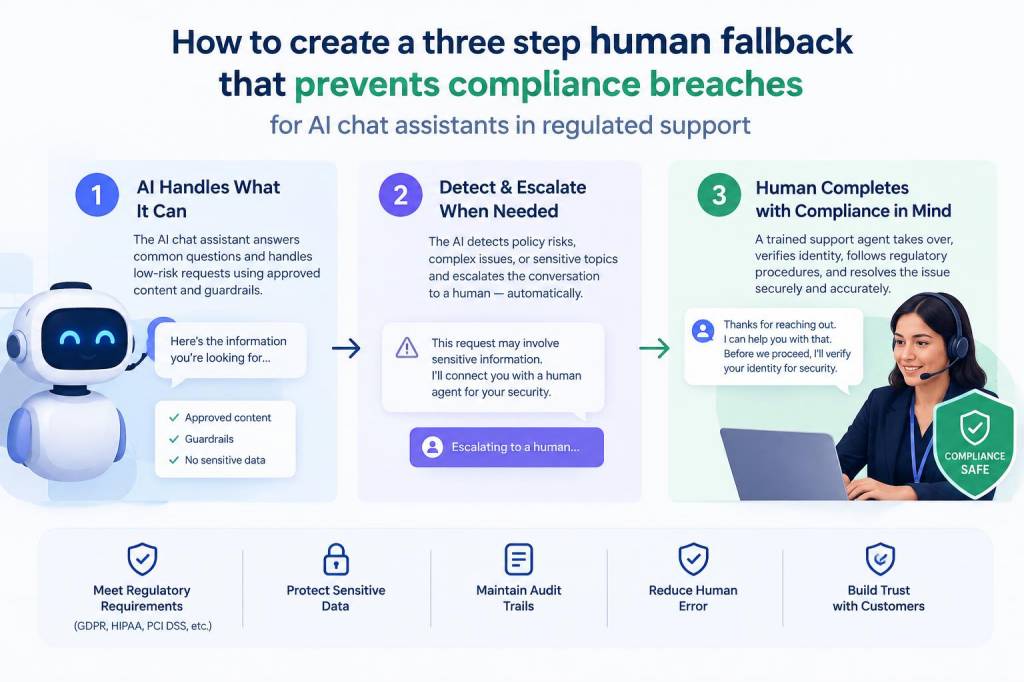
When you deploy AI chat assistants in regulated support — whether handling finance queries, healthcare triage, or any situation touching payment or personal data — the risks aren’t hypothetical. I’ve seen automated agents make confident but non‑compliant recommendations, omit required disclosures, or prompt customers to share sensitive information in the wrong channel. That’s why I build a simple, practical three-step human fallback that minimizes compliance breaches while keeping the customer experience smooth.
Why a three-step fallback, not just “escalate to human”?
“Escalate to a human” is comforting, but it’s rarely specific enough. In regulated contexts, the path from bot to human needs clearly defined triggers, ownership, and an audit trail. A proper three-step model gives us:
Clear decision points for when AI should step back.Fast, predictable routing so regulation‑sensitive cases reach the right human immediately.Documentation that proves you acted appropriately if regulators ask.In practice, the three steps I use are: Detect → Contain → Handoff. Each step has operational rules, tooling needs, and simple UX patterns. Below I unpack each one and share templates you can adopt today.
Step 1 — Detect: built-in, conservative triggers
Detection is the most important control. If the assistant fails to recognise risk, everything else is too late. I combine three detection layers:
Intent & entity flags — Train your NLU to flag intents (e.g., “refund for medical device”, “dispute credit card charge”) and entities (account numbers, insurance IDs, card numbers). Err on the side of over‑flagging. False positives are OK if the containment step is fast.Regulatory keyword lists — Maintain curated keyword lists for your vertical (e.g., “HIPAA”, “PSA”, “card number”, “IBAN”, “claim number”, “prescription”). Use pattern matching (regex) for formats like credit cards or national identifiers to catch data tokens.Confidence thresholds & safety classifiers — If the language model’s confidence drops below a conservative threshold, or if a safety classifier detects hallucination risk, mark the session high‑risk automatically.Operational tips:
Log every flagged event with metadata (timestamp, user ID, conversation text snapshot, flagged reason).Keep a “safelist” for permitted data types and channels — for example, account numbers may be allowed when the user is authenticated in a secure chat widget but not via public web chat.Step 2 — Contain: limit exposure and gather context
Containment is about reducing harm while you prepare for a human intervention. The assistant must shift its behaviour immediately when a detection occurs. I use three parallel containment actions:
Stop‑gap responses — The assistant should use a short, preapproved reply that neither provides regulated guidance nor prompts the user for more sensitive info. Example: “I can’t handle this request fully in this chat. For security and compliance, I’ll connect you to a specialist who can help. May I transfer you?”Channel hardening — If the user is in an insecure channel (public chat, SMS), the assistant must avoid collecting any more sensitive data and offer a secure alternative (e.g., send a secure link, request phone call or authenticated portal session).Context capture — Automatically capture the relevant context and share it with the human agent: the flagged reason, conversation transcript excerpt, user authentication details, and any system data (order number, account status). This reduces back‑and‑forth and speeds resolution.Containment templates are critical. Work with legal and compliance to preapprove the short phrases the assistant will use so you can move quickly without waiting for daily sign‑offs.
Step 3 — Handoff: routing, SLA and human scripting
Handoff is where processes succeed or fail. It’s not enough to route to “support”; you need a fast, documented transfer to the right role with clear SLAs.
Routing rules — Route by risk type: compliance/legal, fraud, financial operations, clinical. Use skills‑based routing in your contact platform (Zendesk, ServiceNow, Genesys, or your IVR) so only qualified agents receive these cases.SLA & urgency tiers — Define strict SLAs: e.g., compliance escalations acknowledged within 15 minutes, resolved or formally logged within 24 hours. For high‑risk issues (data leak, imminent harm), set a minutes‑level response and a phone callback escalation.Human response scripts — Provide agents with the exact language to use, including regulatory disclosures, verification steps, and what not to ask in chat. Scripts reduce inconsistency and the chance of a subsequent breach.Operationally, I add two more disciplines at handoff:
Warm transfer — Whenever possible, the bot initiates a warm transfer that includes the bot’s last message and the captured context, and the human agent greets the user referencing what the bot already said. This signals continuity and reduces user frustration.Escalation audit trail — Every handoff creates a ticket with tags for the trigger type, transcript, agent notes, and timestamps. This becomes an auditable chain for compliance reviews.Monitoring, metrics and continuous improvement
You can’t set and forget. I monitor a small set of metrics that matter for compliance and CX:
Number of detections by type (intent, keyword, confidence).Containment-to-handoff ratio — how many flagged sessions stayed with the bot vs handoffs.Time-to-acknowledge and time-to-resolution for handoffs.Rate of regulatory incidents (near misses and actual breaches).Customer satisfaction and repeat contacts for handed-off sessions.Run weekly reviews with product, legal, and support to tune detection rules and update scripts. Use a sample set of conversations to validate the NLU and safety classifiers. If you use vendor models (OpenAI, Anthropic, etc.), be explicit about their role and keep human reviewers accountable.
Practical checklist and quick templates
Here’s a compact checklist I give to teams when we implement this model—use it as a quick tactical starter:
Define regulated intents and entity patterns.Implement three detection layers (intent, keywords, confidence).Create preapproved containment messages and secure‑channel options.Configure routing to specialist pools with SLAs.Build automatic context capture and ticket creation on handoff.Prepare agent scripts and a training session for high‑risk routing.Set up monitoring dashboards for the five metrics above.Sample bot containment message (approved): “I can’t assist with that directly here due to safety and compliance rules. I’ll connect you to a specialist who can help — can I transfer you now or send a secure link?”
What I recommend when you start
Start conservative. Treat the first 30 days as a safety ramp: tighten thresholds, increase manual reviews, and accept more handoffs than you think necessary. Once you collect data and see common patterns, you can relax rules for low‑risk scenarios and optimise automation. But never remove the three‑step structure: Detect → Contain → Handoff. It’s the backbone that keeps customers safe and your organisation compliant.