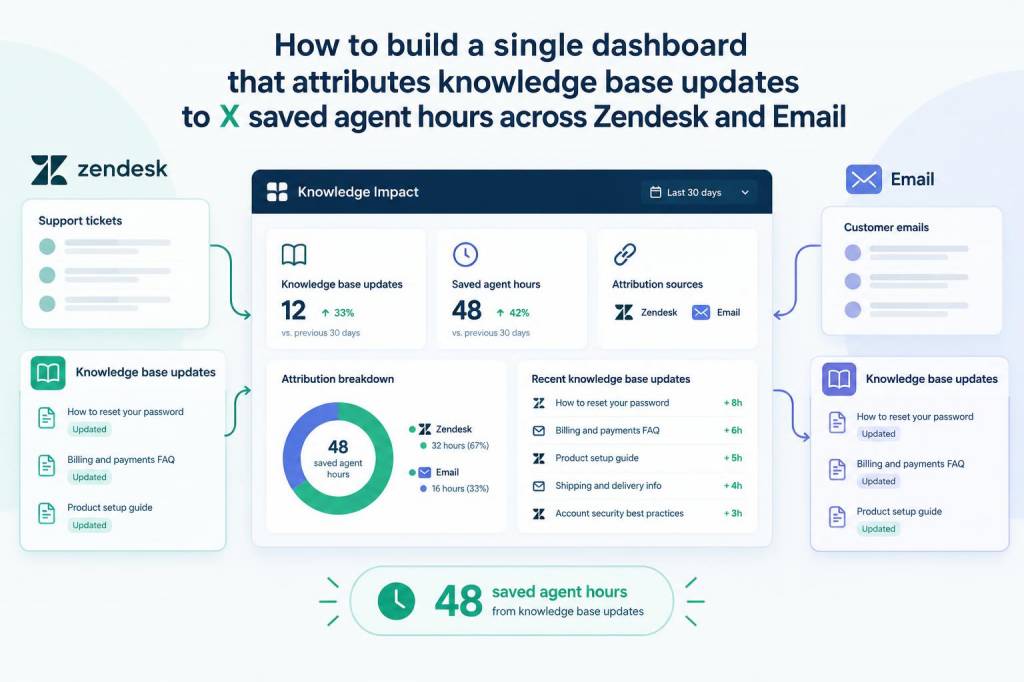
When I first tried to prove the value of our knowledge base, I hit the same roadblocks many support leaders face: fragmented data across Zendesk and our email ticketing system, inconsistent tagging, and a messy timeline between a KB update and the moment agents stop repeating the same answer. What I needed was a single dashboard that could connect KB edits to real-world agent time savings — a concrete number like “X saved agent hours” — and show that across channels. Here’s how I built one, the assumptions I made, the pitfalls I avoided, and the formulas I used so you can replicate it.
Why a single dashboard matters
A unified dashboard does more than report metrics. It creates a narrative: you can show product teams, managers, and execs that investing in documentation directly reduces agent workload. It also helps you prioritize KB work based on impact instead of gut feeling. When your dashboard attributes saved agent hours across Zendesk and email, you get a cross-channel view of efficiency gains — which is what stakeholders care about.
What you need before you start
Gathering clean inputs makes the maths sensible. At minimum you’ll need:
- Access to Zendesk ticket data (via API or export): ticket timestamps, channel, tags, requester, assignee, ticket resolution time, and any custom fields you use for KB references.
- Email ticket data (from the same system if email goes into Zendesk, otherwise from your helpdesk or mail parser): timestamps, thread counts, subject, resolved time, and any markers indicating KB content was used.
- Knowledge base logs: article IDs, publish/update timestamps, author, and view metrics. If you use Help Center in Zendesk this is accessible; if you’re on Confluence, Intercom Articles, or another CMS you’ll need exports or API calls.
- Search and click data (optional but powerful): queries that led to KB views, top search terms, and search refinements.
- Agent activity baseline: average handling time (AHT) per channel, and an estimate of how often an agent’s time is spent repeating KB-covered answers (can be derived from tags or manual sampling).
My core attribution model — intuitive and defensible
I use a hybrid event-based + counterfactual approach. The idea: measure how often solved tickets reference a KB article (directly or indirectly) after a KB update, and estimate the time saved by replacing agent response with self-service. For tickets that don’t explicitly reference KB, use search/click correlation and topic modeling to capture implicit impact.
Key assumptions I document up-front (and show on the dashboard):
- Self-service substitution rate: the percentage of times a KB view would have otherwise resulted in an agent-handled ticket. I start with a conservative 30–50% and refine from experiments.
- Average handle time (AHT): per-channel AHT (Zendesk chat vs. email) should be measured over a relevant window and segmented by topic if possible.
- Attribution window: I typically use 14–28 days post-KB update to capture adoption.
Data model and ETL — how I stitched sources together
Practical steps I followed:
- Extract KB updates table: article_id, title, updated_at, created_at, author, topic tags, total_views_at_update.
- Extract ticket table: ticket_id, channel, created_at, solved_at, resolution_time_seconds, tags, linked_article_id (if present), custom_fields indicating KB use, and a small text snippet of the thread for NLP matching.
- Extract search logs: query, article_clicked_id, timestamp, user_id (if available).
- Normalize timestamps to UTC and join on article_id for explicit references.
- For implicit references, run a fuzzy match / NLP similarity between ticket content and article content (I use cosine similarity on TF-IDF embeddings in Python or use a managed vector search like Elasticsearch or Pinecone).
ETL frequency: I schedule daily imports, with a weekly re-run for backfilled attribution (because tickets created before an article update can still cite it later via follow-ups).
Calculating saved agent hours — the formulas I use
Here are the basic building blocks I display on the dashboard and how I compute them:
| Metric | Formula / Description |
|---|---|
| KB-influenced tickets | Count of tickets within attribution window where linked_article_id exists OR NLP_similarity(article, ticket) > threshold OR search_clickled_to_article within 7 days prior to ticket creation. |
| Potential substitutions | KB-influenced tickets × Self-service substitution rate (default 0.3) |
| Saved seconds | Sum_over_potential_substitutions(AHT_by_channel) |
| Saved agent hours | Saved seconds ÷ 3600 |
| Confidence band | Run sensitivity: substitution rate low/expected/high (e.g., 20/40/60%) and show range. |
Example: if 400 email tickets in 28 days are KB-influenced, substitution rate 30%, average email AHT 900 seconds (15 minutes): potential substitutions = 120; saved seconds = 120 × 900 = 108,000 → saved hours = 30.
Visuals I include on the dashboard
Design to answer stakeholder questions at a glance:
- Time series: weekly saved agent hours (Zendesk vs. email vs. combined).
- Top KB articles by attributed saved hours (sortable by views, update date, author).
- Attribution waterfall: views → influenced tickets → substitutions → saved hours.
- Geography/channel segmentation: where is KB adoption strongest?
- Confidence interval toggles: let users switch substitution rate assumptions to see sensitivity.
- Sampling panel: show raw ticket examples used for NLP matches to build trust.
Practical notes on accuracy and how I validated the model
In early iterations I found two surprising things:
- Explicit links undercount impact: many agents paste KB content without linking, so NLP matching was essential.
- Email threads create ambiguity: people often reply and self-answer after seeing a KB link. I used a conservative attribution window and credit the latest update only if the ticket occurred after it.
I validated the model by running controlled experiments: update or improve 10 high-traffic articles, then monitor related ticket volume and AHT for the next 28 days vs. a matched control set of unchanged articles. Even small wins (5–10% decrease in related tickets) scaled into meaningful hours saved.
Tools and implementation tips
What I used and recommend:
- Data pipeline: Airbyte or Fivetran to pull Zendesk and CMS logs, with transformations in dbt.
- Storage & queries: BigQuery or Postgres depending on scale. I keep normalized tables for tickets, articles, and search events.
- NLP / similarity: scikit-learn TF-IDF + cosine for small teams; for better results use sentence-transformers (SBERT) and vector DB (Pinecone/Elasticsearch).
- Dashboarding: Looker, Mode, or even Google Data Studio for quick wins. I prefer tools that let me parameterize substitution rate live.
Small operational tips I learned the hard way: keep a clear changelog of KB edits (so you can attribute specific edits, not just the article), limit the attribution window and document it for stakeholders, and present both conservative and optimistic scenarios to manage expectations.
What to measure next (beyond saved hours)
Saved agent hours is persuasive, but once you have that dashboard you can extend it to:
- Cost savings (multiply hours by fully-burdened hourly cost).
- CSAT impact for KB-influenced interactions (compare satisfaction post-update).
- Operational staffing forecasts (how many FTEs avoided at current growth rates).
- Feedback loops into product & documentation priorities (pair impact with article quality scores).
Building this dashboard was one of the most effective ways I’ve found to turn content work into measurable outcomes. It forced our team to be rigorous about tagging and logging, to experiment with substitution rates, and — importantly — to tell a simple story to non-support stakeholders: better KB = fewer agent hours and better customer outcomes. If you want, I can share a starter SQL query or a sample dbt model next.